




How to watch Netflix with a VPN — fast streaming and full library

How to watch Netflix with a VPN: maximum streaming speed, full Full HD quality and tips for subtitles in any language.
Strict licensing rules mean many TV series cannot be watched outside the United States. Users also note that the European Netflix catalogue is much smaller than the US one, while the price is significantly higher. To get around this unfairness you can use Rocket VPN — a high-speed VPN service that unlocks the full Netflix library.
Rocket VPN is an excellent VPN for Netflix. Our servers are located inside the United States, so streaming speeds stay very high. Watching content in Full HD is no problem. Using this VPN you can be confident in stable Netflix performance — Rocket VPN runs the latest-generation VPN technology stack.
Rocket VPN uses military-grade encryption. From any country you connect, Netflix sees you as a US viewer. The service works equally well on iOS and Android. If you want to unblock Netflix for online viewing, Rocket VPN handles it today and will continue to in the future.
Rocket VPN — the most reliable way to watch Netflix over VPN
Free alternatives such as Smart DNS exist, but they are inconvenient to use full-time and their throughput is usually low. Most users settle on Rocket VPN: connecting is a single click and our infrastructure is constantly optimised for streaming. If you ever run into a connection issue, our support team will fix it in minutes.
Rocket VPN tip: how to watch Netflix shows with custom subtitles
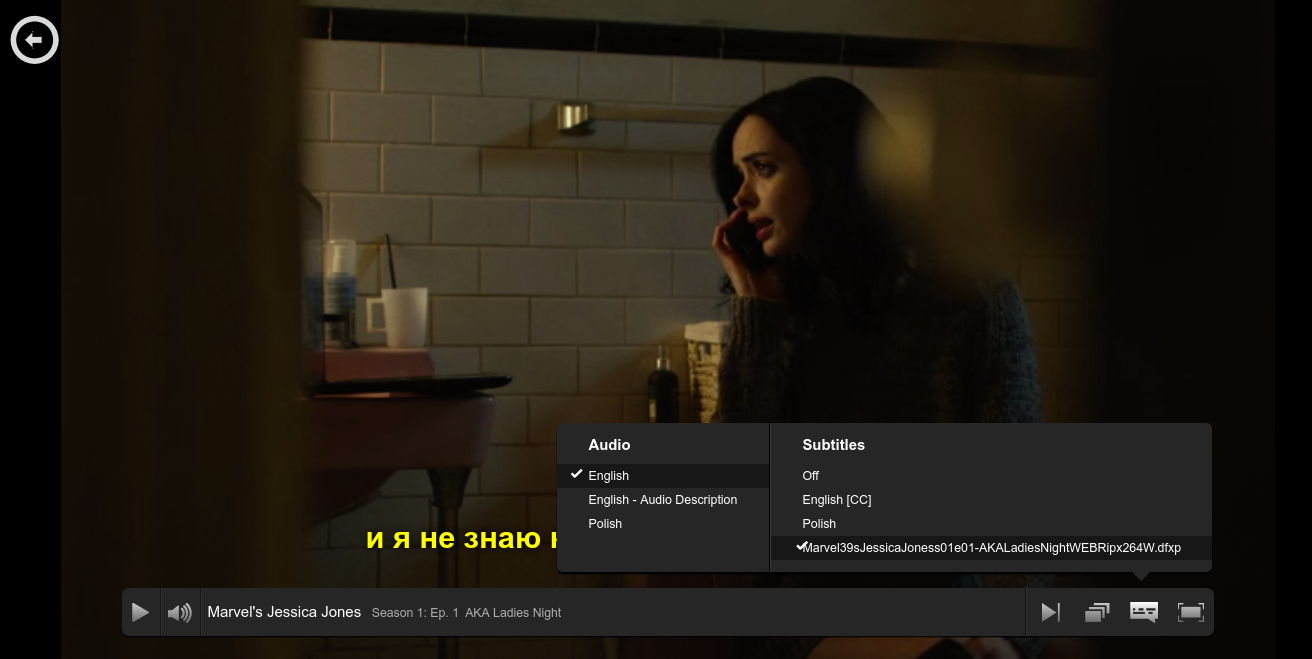
Many people skip the legal Netflix catalogue because the dialogue is in English. The catalogue is huge and full of quality content worth watching. If your English isn't strong enough, use our workflow to add subtitles in your own language. You will need Chrome or Firefox.
- Pick the show you want on Netflix.
- Open opensubtitles.org — the largest community subtitle archive, updated daily.
- Download a subtitle file in the language you need. The format is SRT, but Netflix uses DFXP.
- Convert SRT to DFXP using the free subflicks.com — upload the SRT, download the DFXP.
- Open Netflix. In Chrome press Ctrl + Alt + Shift + T. In Firefox press Alt + Shift + click — a menu appears asking for the subtitle file.
- Done — your show plays with the subtitles you just loaded.
Rocket VPN is the most convenient way to watch Netflix over a VPN. A high-quality VPN guarantees not only streaming speed but also full traffic encryption, keeping your viewing private. Now you know how to watch Netflix through a VPN — quickly, comfortably and securely.