



How to Unblock Telegram on Desktop and Mobile Devices
Step-by-step guide to bypass Telegram blocking on smartphones and PC messenger versions
Using Proxy Servers
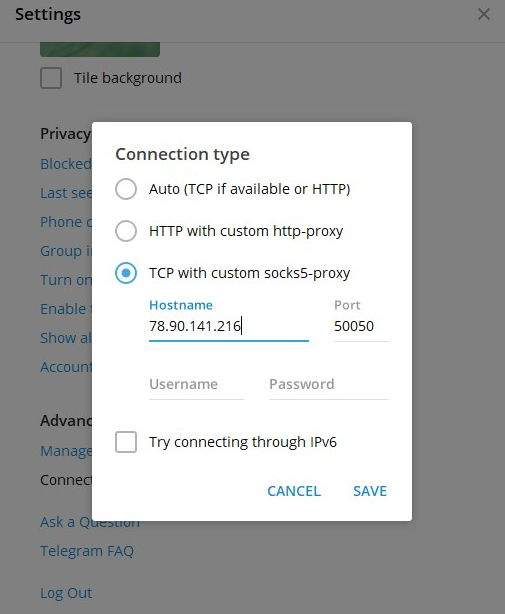
As early as late 2017, Telegram's creators anticipated potential blocking and added SOCKS5 protocol support to their client, allowing users to connect through proxy servers. Today, this method works across all mobile operating systems and PC versions of Telegram. Essentially, all traffic routes through foreign IP addresses that aren't on Roskomnadzor's blocklist.
To switch to an unblocked proxy in Russia, follow these steps:
- Open Telegram settings.
- Select "Data and Storage."
- Choose "Use Proxy."
- Select "SOCKS5" from the menu.
- Enter the proxy server address and port number.
You can find both paid and free proxy servers online. Paid proxies are stable approximately 99.9% of the time, guaranteeing 24/7 access and fast data transfer—making video streaming and large file downloads viable. Free proxies, however, frequently disconnect or become unavailable, and don't guarantee consistent, long-term connectivity.
Telegram's developers recommend using European or US-based foreign proxies. Keep in mind that the greater the physical distance between the proxy location and Russia, the slower your connection will be.
Unblocking Telegram with VPN
A Virtual Private Network (VPN) lets you access any blocked resource or, in this case, the Telegram app by essentially connecting from abroad. VPNs come in two forms: standalone PC applications and browser extensions.
For free VPN clients, popular options include TunnelBear and FreeOpenVPN. However, if you want truly reliable, confidential Telegram access, you should use a trusted service like RocketVPN.
Paid VPN services start at $4 per month, with significant discounts available for six-month or longer subscriptions, bringing monthly costs down to around $2.
How to Access the Blocked Telegram Website
It's likely that telegram.org, Telegram's official support website, will soon be blocked for Russian users. If Telegram is important to you, use the Opera browser, which has its own built-in VPN (though slow), or change your IP address using RocketVPN, which guarantees reliable 24/7 connectivity.
Unblocking Telegram on Smartphones
Smartphone users can use Opera VPN or CyberGhost. Simply tap one button and you'll access Telegram. However, your data could be visible to bad actors, so a paid VPN service is preferable. All free apps also suffer from intrusive advertising.
What Happens Next with Telegram
Roskomnadzor has blocked messengers before—specifically those whose owners refused to comply with FSB demands to provide user data and message logs. BlackBerry Messenger and Line are examples. Yet these continue working smoothly through VPN in Russia. Notably, Roskomnadzor didn't request their removal from app stores. Telegram's situation is more complex, with active negotiations over App Store removal already underway. Users can't update the app or receive push notifications today.
Android users can download it from third-party sites, though major resources like 4Pda have removed Telegram threads.